
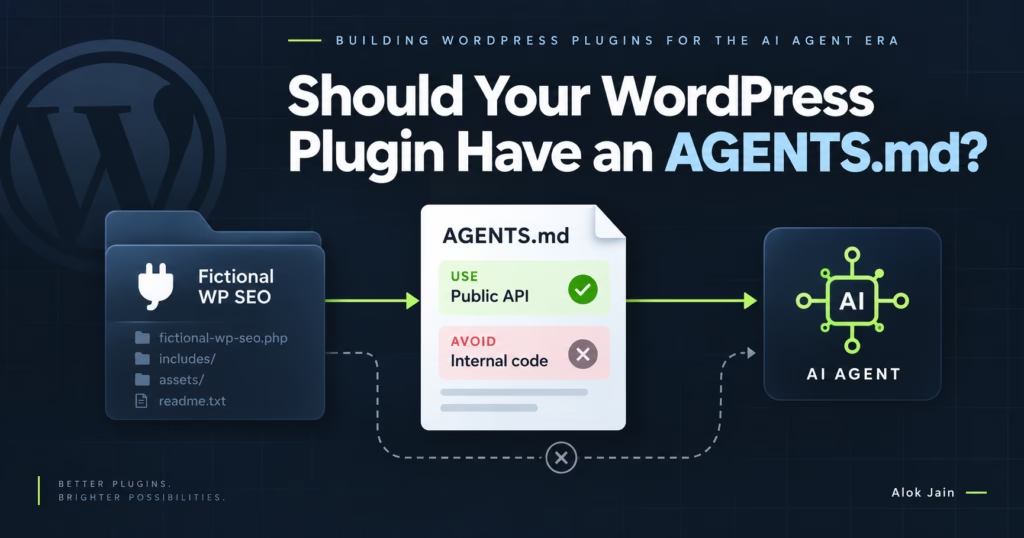
So far we’ve been working from the outside in with FictionalWPSEO. Discoverability, then documentation. Now imagine a developer has actually bought and installed the plugin, opened the project in an AI coding environment, and asked it to create a custom plugin that automatically generates SEO titles for their property custom post type using FictionalWPSEO.
The agent now has access to a project like:
wp-content/
├── plugins/
│   ├── fictionalwpseo/
│   ├── woocommerce/
│   └── property-manager/
└── themes/
    └── property-theme/
FictionalWPSEO is right there. Does that mean the agent knows how we want it to interact with the plugin? Not necessarily. This is where AGENTS.md gets interesting.
What is AGENTS.md?
At its simplest, it’s a markdown file with instructions and context for coding agents working in a codebase, similar in spirit to a README but for a different audience. A README tells a developer “FictionalWPSEO is a WordPress SEO plugin providing metadata, Schema, sitemap and redirect functionality.” An AGENTS.md tells a coding agent “when modifying SEO metadata from another plugin, use the public FictionalWPSEO PHP API. Do not directly update internal plugin options or post meta.” Very different kinds of information: the first explains the product, the second explains how software should work with it.
Not an AI ranking file
Worth saying clearly: dropping AGENTS.md into FictionalWPSEO doesn’t make ChatGPT or Claude start recommending our plugin. It’s not a substitute for good documentation, search visibility, reviews, third-party mentions, product authority, or clear APIs. Its value shows up once a coding agent is already working with a repository and can read the file. So it sits at the end of the chain: the public website and documentation help someone understand and evaluate the plugin, they select it, install it, and only then does AGENTS.md help the coding agent work with it. It’s agent usability, not agent discovery.
Adding one to FictionalWPSEO
The plugin folder might now look like:
fictionalwpseo/
├── AGENTS.md
├── README.md
├── fictionalwpseo.php
├── includes/
├── src/
├── assets/
├── languages/
└── vendor/
What goes in it? The temptation is to paste the whole documentation site in. I wouldn’t. An agent doesn’t need a 20,000 word manual every time it looks at the project. Treat the file as a map and a short set of working instructions:
# FictionalWPSEO

FictionalWPSEO is a premium WordPress SEO plugin.

It manages:
- SEO titles and descriptions
- canonical URLs
- XML sitemaps
- Schema.org markup
- Open Graph metadata
- redirects
- WooCommerce SEO

## Developer Integration

When another plugin or theme needs to interact with FictionalWPSEO,
use the documented public APIs. Do not directly modify internal
plugin options, database tables, post meta keys or classes marked
as internal.

Developer documentation:
<https://fictionalwpseo.com/docs/developers/>

## Updating SEO Metadata

Use fictionalwpseo_update_meta(). Documentation:
<https://fictionalwpseo.com/docs/developers/php-api/update-meta/>

## Hooks

<https://fictionalwpseo.com/docs/developers/hooks/>

## REST API

<https://fictionalwpseo.com/docs/developers/rest-api/>

## Security

Always use WordPress capability checks, sanitisation and escaping.
Do not bypass FictionalWPSEO validation when updating SEO data.

## Compatibility

WordPress: 6.8+
PHP: 8.1+
Already useful. The agent has a starting point.
Tell it which interfaces are public
This matters especially for a commercial plugin. Say FictionalWPSEO contains a class FictionalWPSEO\Internal\Meta\MetaRepository. An agent searching the source might conclude it can instantiate this and write directly to the repository. Technically it might work today. But it’s an internal implementation detail, and version 4.0 might replace it entirely. We don’t want third-party integrations depending on it, so AGENTS.md should say so plainly: classes under FictionalWPSEO\Internal are implementation details and must not be used by themes or third-party plugins, use the documented public API instead. That one instruction can prevent a lot of fragile generated code.
Public API versus internal implementation
This is a real architecture issue, not just a documentation one. Say FictionalWPSEO stores its title in _fictionalwpseo_title. An agent inspecting the database might generate update_post_meta( $post_id, '_fictionalwpseo_title', $title ), which works, but we don’t want integrations doing that. Our real update function might also validate the value, clear caches, fire hooks, update an SEO index, record a revision, and sync REST data. Writing directly to post meta skips all of that. So the instruction should be explicit: don’t update FictionalWPSEO post meta directly, use fictionalwpseo_update_meta(). We’re not just telling the agent what’s possible; we’re telling it what’s supported.
Give it a small working example
## Example

To update the SEO title:

\`\`\`php
$result = fictionalwpseo_update_meta(
    $post_id,
    [
        'title' => 'Custom SEO Title',
    ]
);

if ( is_wp_error( $result ) ) {
    error_log( $result->get_error_message() );
}
\`\`\`
Intentionally small. Full documentation can hold the larger examples; AGENTS.md just needs to establish the correct pattern.
Tell it what not to do
One of the most useful sections you can write:
## Do Not

Do not:
- modify FictionalWPSEO database records directly
- update internal post meta keys
- call classes under the Internal namespace
- duplicate sitemap generation
- manually output SEO tags already managed by FictionalWPSEO
- disable validation when updating SEO metadata
An agent is trying to solve the user’s problem, and if it sees several possible paths it may take the shortest one. Our job is to tell it which path is actually supported.
WordPress conventions matter too
If someone asks for an integration between FictionalWPSEO and their property plugin, the agent might generate perfectly valid PHP that still doesn’t follow our conventions. A short guidance block helps:
## WordPress Development

When generating integration code:
- use WordPress hooks rather than modifying plugin files
- use WordPress capability checks for privileged operations
- sanitise incoming data
- escape output at render time
- use WP_Error for recoverable API failures
- use public FictionalWPSEO APIs only
For your own repository you can go further, PHP coding standards, namespace conventions, translatable strings, permission callbacks required on new REST endpoints. Now the file helps an agent contributing to the plugin itself, not just integrating with it.
Two different audiences
Worth separating. An agent might encounter FictionalWPSEO integrating with it, building another plugin or theme, and needing the public PHP API, hooks, filters, REST API, supported patterns, and what internal APIs to avoid. Or it might encounter FictionalWPSEO developing it, if your own team uses coding agents, and needing architecture, directory structure, coding standards, build commands, testing, security requirements, release conventions, internal APIs. Different jobs. If one file serves both, structure it accordingly.
Don’t turn it into another README
A weak version reads like:
# FictionalWPSEO

FictionalWPSEO is the ultimate SEO solution for WordPress.
Our powerful SEO tools help websites rank higher...
Not useful, the agent doesn’t need marketing copy, it needs operational information. Better to open straight into public interfaces, internal interfaces to avoid, security requirements, and documentation links. Short, factual, actionable.
Link to canonical documentation
This connects back to the previous article. We already built good public documentation; AGENTS.md can just point to it:
## Documentation

PHP API: <https://fictionalwpseo.com/docs/developers/php-api/>
Hooks: <https://fictionalwpseo.com/docs/developers/hooks/>
REST API: <https://fictionalwpseo.com/docs/developers/rest-api/>
WooCommerce: <https://fictionalwpseo.com/docs/woocommerce/>
Schema: <https://fictionalwpseo.com/docs/schema/>
Another reason documentation needs stable URLs. The agent file becomes a lightweight map to the canonical source rather than a duplicate of it.
Keep version information in mind
If FictionalWPSEO 3.0 changes the recommended API, AGENTS.md needs to change with it:
## Version

These instructions apply to FictionalWPSEO 3.x.
For 2.x integrations, see: <https://fictionalwpseo.com/docs/2.x/>
Otherwise we create exactly the problem we’re trying to solve: agents following outdated instructions. Ideally the AGENTS.md shipped with a given plugin version describes that version.
Don’t put secrets in it
Obvious but worth stating. No license keys, API secrets, private credentials, deployment passwords, internal tokens, or customer information. Treat it as something developers, dev tools, and automated systems with repository access can all read. Nothing in it should depend on staying secret.
Should a paid plugin include one?
I think this is where FictionalWPSEO is a genuinely useful example. It’s not open source, it’s a commercial plugin downloaded after purchase, and that doesn’t prevent us from shipping AGENTS.md inside the package. It doesn’t expose source code publicly, it just accompanies code the customer already has. It tells coding agents: here’s the supported way to integrate with this commercial plugin. Commercial developer-focused plugins may have a particularly strong reason to do this. If developers are paying for the product, you want AI-assisted development to produce integrations that actually use your APIs correctly.
Not just for plugins
An agency building a large custom WordPress site could use the same idea at the project root: custom post types, ACF field architecture, REST endpoints, Gutenberg blocks, WooCommerce customizations, build process, theme structure, coding standards, deployment rules. Then a coding agent joining the project has a real map. For example:
# Project Instructions

## Property Content Type

The `property` custom post type is registered by the
property-manager plugin. Do not register it in the theme.

## Custom Fields

Property fields are managed through ACF. Do not access ACF field
values directly from wp_postmeta. Use get_field().

## SEO

SEO is managed by FictionalWPSEO. Do not output custom title,
canonical or Schema tags from the theme.
Three instructions, and think about how many common WordPress mistakes they prevent.
The idea matters more than the filename
I wouldn’t get too attached to AGENTS.md as a specific filename. AI coding tooling moves fast, and different tools may use different instruction mechanisms or conventions that evolve over time. The durable principle is simpler: give coding agents explicit instructions about how your WordPress project or plugin is meant to be used, rather than expecting them to infer everything from thousands of PHP files. That principle holds even if the exact convention changes.
Our FictionalWPSEO AGENTS.md
If I were shipping today, I’d start with roughly this:
# FictionalWPSEO Agent Instructions

FictionalWPSEO is a premium WordPress SEO plugin.

## Requirements
WordPress 6.8+
PHP 8.1+

## Public APIs

Use documented public APIs when integrating with FictionalWPSEO.

PHP API: <https://fictionalwpseo.com/docs/developers/php-api/>
Hooks: <https://fictionalwpseo.com/docs/developers/hooks/>
REST API: <https://fictionalwpseo.com/docs/developers/rest-api/>

## SEO Metadata

Use fictionalwpseo_update_meta() to update SEO metadata.
Do not directly modify FictionalWPSEO post meta.

## Internal Code

Do not depend on classes under FictionalWPSEO\Internal.
These are not part of the public API and may change without
backward compatibility.

## WordPress Integration

Use WordPress actions and filters.
Do not modify FictionalWPSEO plugin files.

## Security

Respect WordPress capabilities. Sanitise incoming values.
Escape rendered output. Do not bypass FictionalWPSEO validation.
REST endpoints must use appropriate authentication and
permission checks.

## Documentation

<https://fictionalwpseo.com/docs/>
Not complicated, but genuinely useful context.
A problem hiding in that file
We keep telling the agent “use our public PHP API.” Easy to say, but is the API actually good enough for an agent to use? Say our documentation exposes fifteen inconsistently named functions:
fictionalwpseo_set_title();
fwpseo_description_update();
FictionalSEO()->canonical()->save();
update_option( 'fwpseo_schema', ... );
do_action( 'fictional_meta_update', ... );
AGENTS.md can’t fix a badly designed API. If we want agents to reliably generate integrations, the interface itself needs to be predictable, and that’s a plugin architecture problem, not a documentation one. So the next question isn’t “how do I explain my plugin to AI,” it’s how to design the WordPress plugin API so both developers and agents can use it without guessing.
Next: Give AI Agents Code They Don’t Have to Invent